You can write the best content in your industry and still not rank if Google can’t crawl, render and index it properly. Technical SEO fixes the foundation: how your site is built, how fast it loads and how clearly it explains itself to search engines and AI crawlers.
Rapid Digify provides technical SEO services in Bangladesh and worldwide, with a strong focus on WordPress, Shopify and WooCommerce sites.
What we check and fix
- Crawling and indexing: robots.txt, noindex tags, crawl budget, orphan pages, Search Console coverage errors
- Site speed and Core Web Vitals: LCP, INP and CLS, image compression, caching, render-blocking scripts and heavy page builders
- Site architecture: URL structure, internal linking, click depth and pagination
- Duplicate content: canonical tags, parameter URLs, www and non-www, http and https, faceted navigation
- Redirects: redirect chains, broken links, 404 errors and migration mapping
- Structured data: Organization, LocalBusiness, Service, Product, FAQ and Article schema
- Mobile usability: layout, tap targets and font sizes on real devices
- JavaScript rendering: making sure key content is in the HTML, not only loaded by scripts
- AI crawler access: rules for GPTBot, PerplexityBot and Google-Extended, plus llms.txt
- International SEO: hreflang for sites serving several countries or languages
How a technical SEO project runs
- Full crawl of the site plus a review of Search Console, analytics and server logs where available.
- A prioritized issue list, sorted by impact and effort, written so a developer can act on it.
- Implementation. As a WordPress developer I can fix most issues directly, or work alongside your team.
- Recrawl and verification so nothing gets marked done until it is actually fixed.
Common problems we find
Indexable tag and attachment pages that dilute the site, product filters creating thousands of duplicate URLs, page builders loading two megabytes of scripts on every page, and important pages sitting five clicks deep with no internal links. These are fixable, usually faster than people expect.
Not sure where to start? Book a full SEO audit. Running WordPress? See WordPress SEO services. Selling online? See ecommerce SEO.
Proof: a real technical SEO result
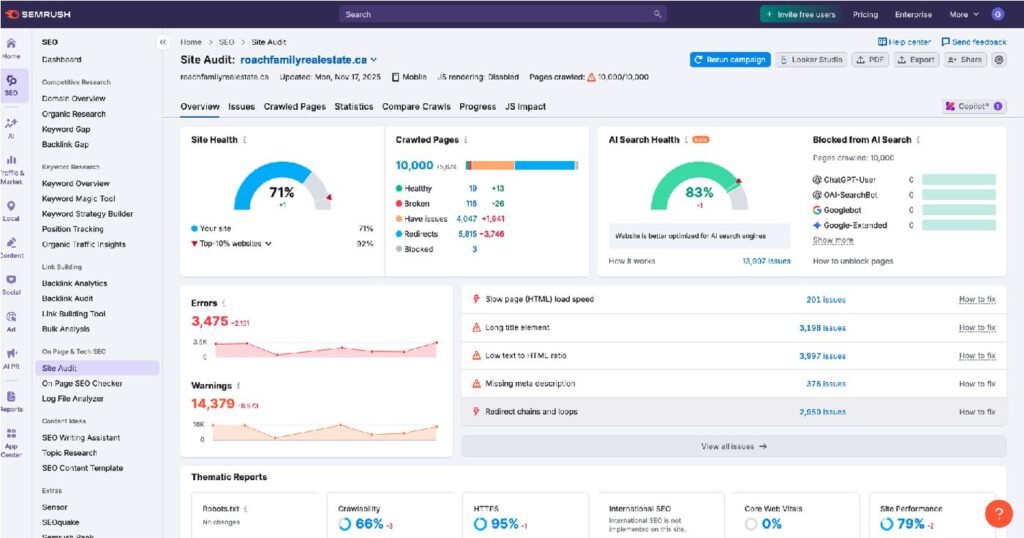
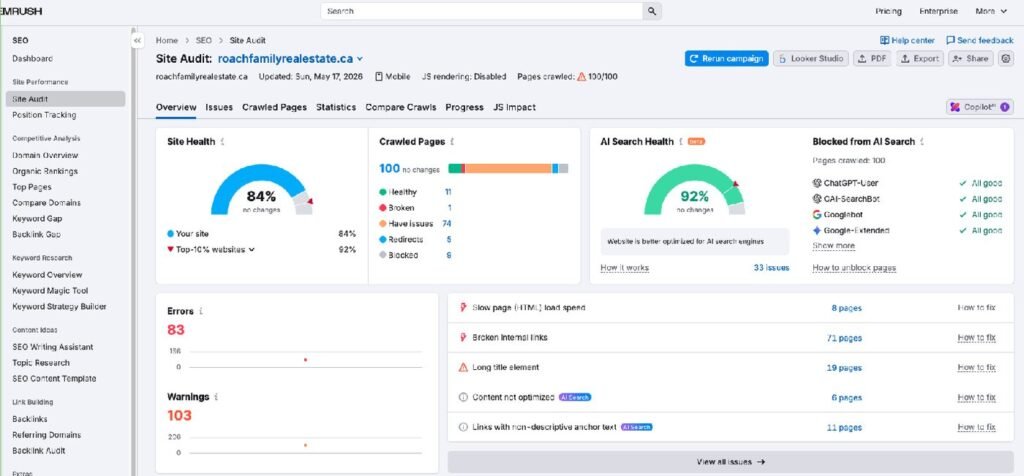
A Milton real estate team lost most of its pages from Google after a botched migration. Fixing redirects and indexing took clicks from 6 to 608 in three months and cut site errors from 3,475 to 83. Read the case study.

Technical SEO checklist: what I look at first
| Area | What I check | Why it matters |
|---|---|---|
| Indexing | Search Console coverage, noindex tags, canonical tags | Pages Google doesn't index can't rank at all |
| Crawling | robots.txt, sitemaps, orphan pages, crawl depth | Google and AI bots need a clear path to every important page |
| Redirects | Chains, loops, old URLs after a redesign | Broken migrations are the most common cause of sudden traffic drops |
| Speed | Core Web Vitals on mobile, image size, scripts, caching | Slow pages lose visitors and rankings |
| Duplicates | www vs non-www, http vs https, parameter URLs | Duplicates split your authority between copies of the same page |
| Structured data | Organization, LocalBusiness, Service, Product, FAQ schema | Helps Google and AI tools understand exactly what you offer |
| On-page basics | Titles, H1s, meta descriptions, alt text | Small fixes here often bring the quickest wins |
| Security | HTTPS, malware, spam pages, hacked content | Hacked pages can get a whole site flagged or dropped |

Some of the biggest problems are tiny. On the Roach Family site, the homepage heading literally said "Homepage" and the title tag was pulling in review text. Fixing that took minutes. Finding it is the hard part, which is why the audit comes first.
Core Web Vitals in plain English
- LCP (Largest Contentful Paint): how long until the main content appears. Aim for under 2.5 seconds on mobile.
- INP (Interaction to Next Paint): how quickly the page reacts when someone taps or clicks. Heavy scripts and page builders are the usual cause of problems.
- CLS (Cumulative Layout Shift): how much the page jumps around while loading. Images without sizes and late-loading banners cause it.
Fixes are usually a mix of caching, compressing images, removing scripts you don't need and setting image sizes. I make the changes with backups first and measure before and after.
Technical SEO for AI crawlers
AI search adds a new layer to technical SEO. ChatGPT, Perplexity and others use their own crawlers, such as OAI-SearchBot, GPTBot and PerplexityBot. Many sites block them by accident through a security plugin, a firewall rule or an old robots.txt. I check that the crawlers you want can reach your pages, that important content is in the HTML rather than hidden behind scripts, that your schema is clean, and that an llms.txt file points AI tools to your key pages.
Website migrations without losing traffic
The Roach Family case started with a migration that went wrong: old URLs were never redirected, Google saw two versions of the site, and most pages dropped out of the index for months. If you are planning a redesign, a new domain or a platform change, technical SEO should be part of the plan from day one:
- Crawl and save every current URL and its traffic before anything changes
- Map each old URL to its new equivalent
- Set up 301 redirects and test them before launch
- Keep titles, headings and content on key pages close to what ranked
- Submit the new sitemap and watch Search Console daily for the first few weeks
Signs your site has a technical SEO problem
- Traffic dropped suddenly after a redesign, a new theme or a move to a new domain
- Search Console shows lots of pages as "Crawled, currently not indexed" or "Discovered, currently not indexed"
- New pages take weeks to appear in Google, if they appear at all
- Your site feels slow on mobile, especially pages built with a page builder
- Google shows the wrong title or the wrong page for your brand name
- Strange pages in Japanese or Chinese, or spam URLs, show up when you search site:yourdomain.com
Technical SEO for WordPress sites
Most of the sites I work on run WordPress, and as a WordPress developer I can fix problems directly rather than just listing them. The common WordPress issues are:
- Too many plugins loading scripts on every page
- Heavy page builders slowing down mobile pages
- Tag, category, author and attachment pages getting indexed as thin duplicates
- SEO plugin settings left on defaults, with missing schema and messy sitemaps
- No page caching, or caching set up in a way that breaks forms
- Outdated plugins and themes that leave the site open to hacks and spam
See WordPress SEO services for the full WordPress checklist.
What you get from a technical SEO project
- A full technical audit with every issue ranked by impact, explained in plain English
- The fixes done directly on your site, with backups first and a change log
- Before and after numbers: site health, Core Web Vitals, indexed pages and errors
- A check that Google and AI crawlers can reach and understand every important page
- A short list of things to watch so the same problems don't come back
Automated audit report vs hands-on technical SEO
| Automated tool report | Hands-on technical SEO | |
|---|---|---|
| What you get | Hundreds of warnings, many harmless | The issues that actually hurt rankings, ranked by impact |
| Context | None: every site gets the same checks | Based on your traffic, platform and business goals |
| Fixes | You or your developer work it out | Done on your site, with backups and a change log |
| AI crawlers and schema | Usually not checked | Checked and fixed |
| Proof | A new score | Before and after data from Search Console |
How long technical fixes take to show results
| When | What usually happens |
|---|---|
| Days to 2 weeks | Speed, title and on-page fixes show up as soon as Google recrawls the pages. |
| 2 to 6 weeks | Indexing and redirect fixes start bringing pages back into Google. This is when the Roach Family clicks started climbing. |
| 2 to 3 months | Full recovery from a broken migration, and steady gains from cleaner site structure and internal links. |
Want to see what a finished audit looks like? Browse these SEO audit examples with real screenshots.
Once the technical foundation is fixed, authority is the next lever. See our link building services.
Start with a free SEO audit
Send your website and I will reply within 24 hours with the main problems holding it back and what I would fix first. No sales pressure and no obligation.
Get a Free Audit
Let's find the exact keywords and fixes you need to rank #1.
Frequently Asked Questions
What is technical SEO?
Technical SEO is improving how a website is built so search engines and AI crawlers can crawl, render and index it efficiently. It covers speed, indexing, site structure, duplicate content, redirects and structured data.
How often should I do a technical SEO audit?
Once a year for stable sites, and always before and after a redesign, platform change or domain migration.
Can you fix the issues or only report them?
Both. Most WordPress and Shopify issues I fix directly. For custom platforms I write developer-ready tickets and verify the fixes afterwards.
Will technical fixes break my site?
Not if they are done carefully. I back up before every change, test on the live site straight after, and keep a log of what changed so anything can be reversed.
Do you work on Shopify and custom sites, or only WordPress?
WordPress is my strongest platform because I am also a WordPress developer, but I also work on Shopify, WooCommerce and custom sites. On closed platforms some fixes go through the platform settings or your developer.
What tools do you use for technical audits?
Google Search Console and GA4 for real data, Screaming Frog for crawling, Semrush and Ahrefs for site audits and links, and GTmetrix and PageSpeed Insights for speed.